

Java Exam Diaries: Preparing for Exam, Concepts, Traps & Pitfalls

8th of August, 2026
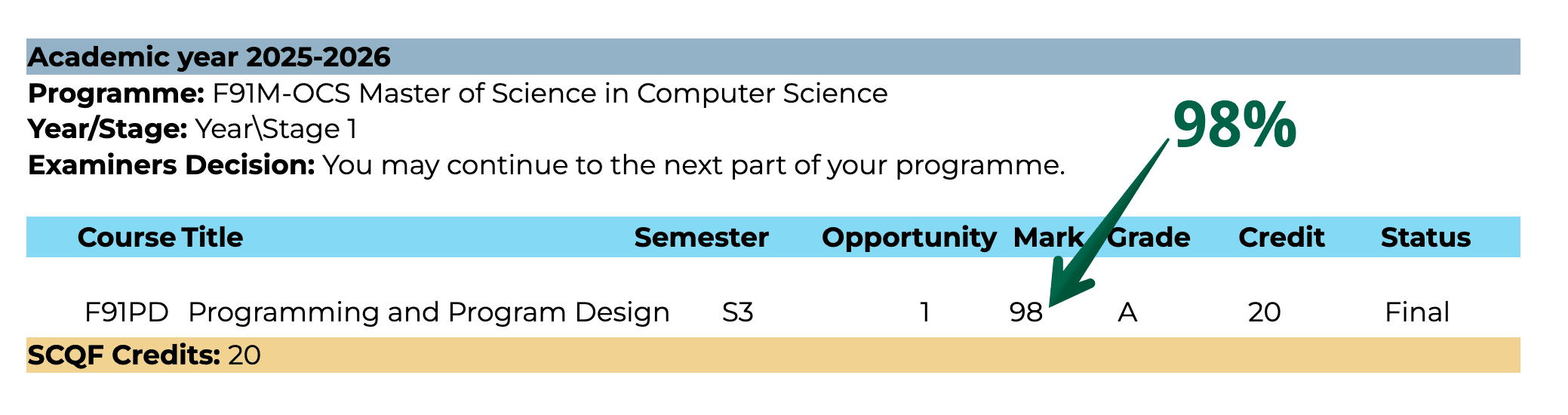
Plot twist: I prayed just to pass… and got 98% omg🎉
❤️ Reference Acknowledgments:
A heartfelt gratitude to Professor Christos Chrysoulas for delivering such an amazing and inspiring Java programming course! A big and sincere thank you as well to Dr. Abrar Ullah for directing this master's degree programme❤️
I would like to give a special thank you to Miss Tess Watt for her wonderful academic support, dedication, and commitment to helping us succeed. ❤️
A big thank you as well to everyone behind the scenes, Miss Carol, Miss Debbie, Mr Richard and Miss Louise, for always being there to help us throughout our studies. ❤️
Thank you all for your dedication, encouragement, and unwavering commitment to supporting us throughout our studies! 🙏🎓
This review reflects my personal learning experience and thoughts based on the materials covered so far in the MSc Computer Science online degree provided by Heriot-Watt University, delivered on the Coursera platform.
📚 Read the full stories
- Overview: PBA Route Success Story: wondering how I got into this master's without a prior degree? 😂
- Part One: Preparing for Exam (you are here): the Java traps and tricky concepts I studied
- Part Two: Actual Exam & Viva: my comedy diary of exam day and the viva
Introduction
Way back when I was preparing to enter this master's degree, I used to look for a funny successful student who was also kind enough to share their exam survival experience in detail online. Someone who would tell me what the exams were actually like (not the usual “just study hard bro” advice), how they prepared, what worked, what didn't, and what they wished they'd known beforehand.
Now, I want to be the person I was looking for back then. So I decided to document my actual Java exam experience in diary format. I'm not here to tell you there's a bulletproof formula for passing or that my way is the only way. I'm just sharing my comedy memoirs of how I survived my exam crisis.😂 The Java diary has two parts.
Part one, Preparing for Exam (this page), is where I wrote about the traps, tricky topics and concepts that I encountered in both the practice exams and the actual exam. Of course I'm not allowed to tell you the actual exam questions Haha! But I can share the topics that confused me the most. Chances are, you might also come across some of these tricky common pitfalls in your exam.
Part two, Actual Exam & Viva, is where I wrote: here's what I did, where I messed up, what I overthought for no reason, and how I actually survived the exam. The grade was just a bonus because I originally just really wanted to pass.
Part One: Concepts, Traps & Pitfalls That Could Cost You Points in Exam
These study notes helped me ace both the final exam and the viva. I hope they'll help you get familiar with the tricky traps of Java, so you can also ace your exams!❤️
I've listed the parts of Java syntax that I found most confusing as I learned them throughout my master's journey. I also included some practical tips that I discovered while solving math problems involving the modulo operator (%) and working through some tricky aspects of Java syntax.
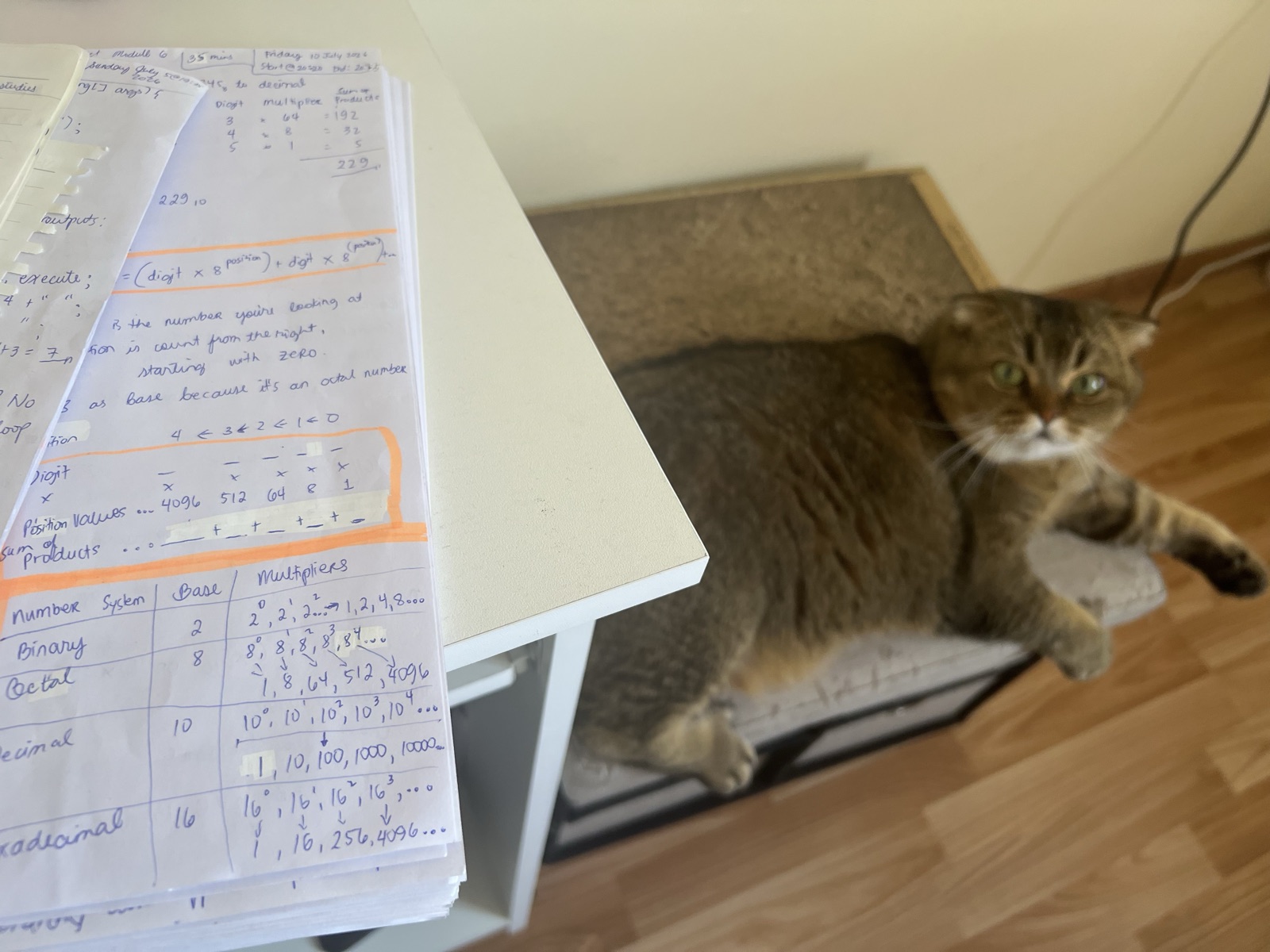
1.1 Solving Modulo Operations using Formula
Solving for the remainder is quite easy when dealing with positive integers. For example:
16 ÷ 5 = 3 with a remainder of 1.
Therefore:
16 % 5 = 1
However, as a student, I initially found it challenging when problems involved negative integers, cases where the dividend is smaller than the divisor, or situations where I needed to understand how Java handles the % operator. For example, what is 1 % 10?
My Discovery: Formula for solving Remainders
I found it helpful to use this golden formula:
Remainder = Dividend − (Divisor × Integer Quotient)
For example:
1 % 10
The integer quotient is 0, so:
1 − (10 × 0) = 1
Therefore:
1 % 10 = 1
Important: In Java, the % operator calculates the remainder. When integer operands are negative, the remainder has the same sign as the dividend (or is zero). For example:
-16 % 5 = -1
This is because Java's integer division drops the decimal part and rounds the result toward zero:
-16 / 5 = -3
Therefore:
-16 − (5 × -3) = -1
This approach has been a lifesaver for me, especially during the exam, where programming questions involving loops used the % operator. Understanding how the % operator works is very useful in programming, particularly when working with loops.
1.2 Difference between the == Equals Operator and the .equals() Method
As a student, I easily got confused between the equals operator (==) and the .equals() method. So, let's break down the difference:
In Java, == and .equals() are used for comparison, but they work differently:
== operator: For objects, it compares whether two references point to the same object in memory. For primitive types, it compares their actual values.
.equals() method: Compares the content or logical value of two objects, depending on how the method is implemented.
For example:
String a = new String("Hello");
String b = new String("Hello");

System.out.println(a == b);       // false
System.out.println(a.equals(b)); // trueHere, a and b contain the same text but refer to different String objects. Therefore, == returns false, while .equals() returns true.
In short: Use == to compare primitive values or object references, and .equals() to compare the contents of objects.
Cases when the == Operator returns True
- With primitives
int a = 10;
int b = 10;

System.out.println(a == b); // trueFor primitives, == compares the actual values.
- With objects of same reference
String a = "Hello";
String b = a;

System.out.println(a == b); // trueHere, b = a means both variables refer to the same String object, so the == operator returns true.
1.3 Multiple Exceptions: throws Clause vs. Single catch Clause
A common Java syntax difference to remember is the separator used between the exception types. I listed it here because it's easy to accidentally use a comma instead of a pipe (|) when specifying multiple exceptions inside catch().
1. throws multiple exceptions clause → use comma ,
With a throws clause, multiple exception types are separated by commas:
void readFile() throws IOException, SQLException {
    // ...
}The comma separates the exception types in a list of exceptions that the method may throw.
This is similar to how commas separate method parameters:
void foo(int x, String y) {
    // ...
}2. Multiple exceptions in a single catch clause → use pipe bar |
When handling multiple exception types in a single catch clause, the exception types are separated by a pipe bar |:
try {
    // ...
} catch (IOException | SQLException e) {
    // Handle either exception
}Here, IOException | SQLException represents alternative exception types that can be handled by the single catch block.
In other words, the same catch block handles either an IOException or a SQLException.
The catch parameter e represents the exception caught from either alternative.
Why are the separators different?
They represent different grammatical constructs in Java:
| Syntax | Separator | Meaning |
|---|---|---|
throws IOException, SQLException | , | A list of exception types the method may throw |
catch (IOException | SQLException e) | | | Multiple alternative exception types handled by one catch block |
So a useful trick is:
, = list| = multiple alternative exceptions
The Java Language Specification defines these separately: a throws clause contains a comma-separated list of exception types, while a multi-catch parameter uses | between alternative exception types.
Easy way to remember
throws IOException, SQLException
       //     "and/or list"

catch (IOException | SQLException e)
// "or"So:
throws → use comma ,
multiple exceptions in single-catch → use pipe |
For more info, see: Oracle Documentation
1.4 Java Exception Hierarchy
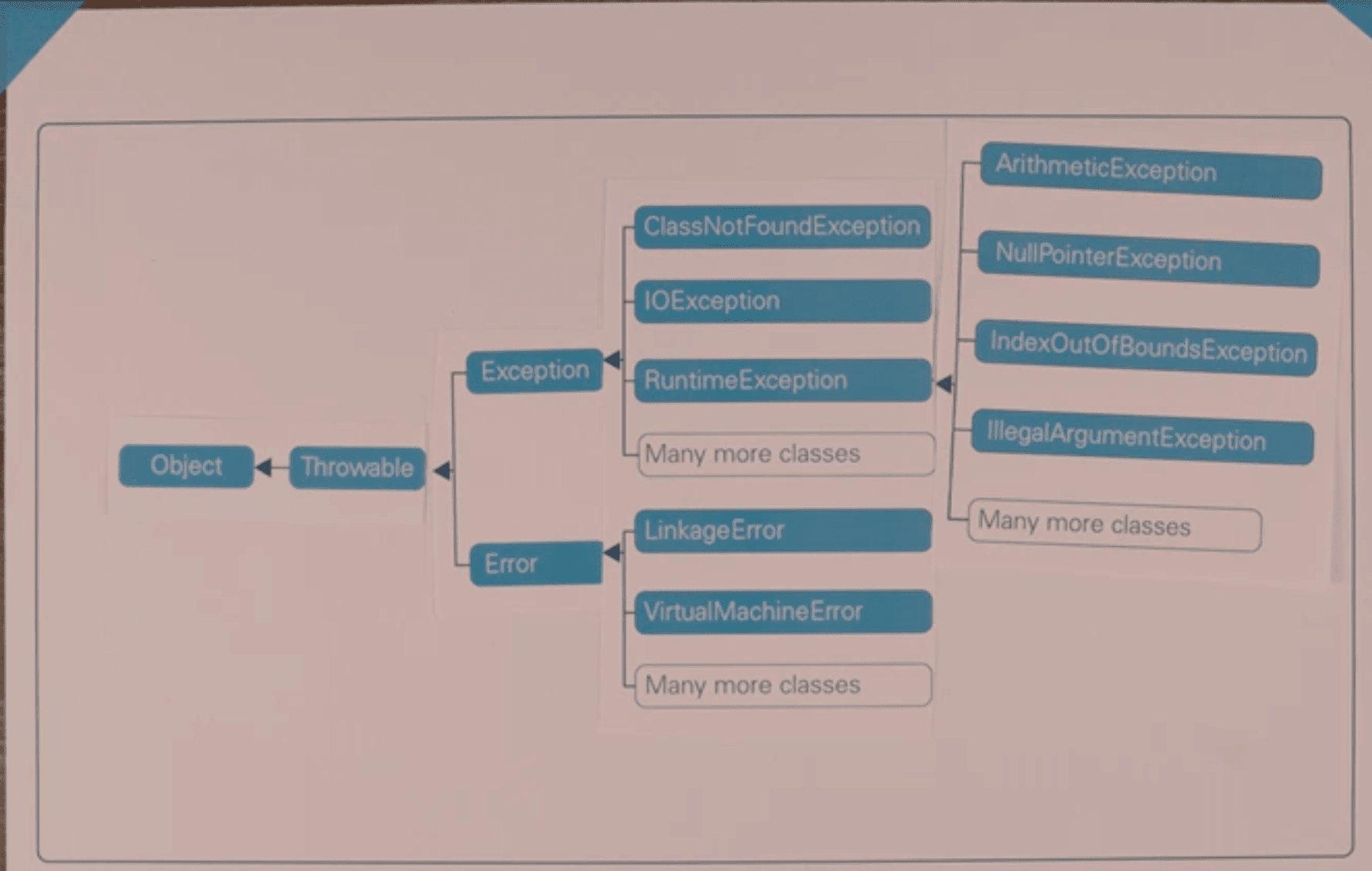 Photo source: Module 10 of the Java Programming course, MSc Computer Science at Heriot-Watt University.
This is the Java Exceptions hierarchy as we learn it in Module 10 of the Java Programming course, which is the first subject of the MSc Computer Science programme.
We can see that Throwable is the superclass of both Exception and Error. Under these two categories, there are numerous subclasses.
Key Takeaway:
Important: I learned that it is very important to be specific when writing exception handlers. For example, if you need to catch only IOException and SQLException, you can use the pipe (|) format we discussed in Section 1.3.
I understood that using Throwable might catch more than you expect because Throwable is the superclass of both Exception and Error. As a result, it can catch errors and exceptions that you may not intend to handle.
So I learned that it is generally better to catch only the specific exceptions that you expect and know how to handle. This makes your code more predictable, easier to understand, and less likely to hide unexpected problems.
1.5 Distinction between void and Return Methods
A common point of confusion when learning Java is the difference between a method that uses void and a method that returns a value.
Key Difference
void method: Performs an action but does not return a value.
Return method: Returns a value using the return keyword.
For example, a getter returns a value, while a setter does not:
class Student {

    private String name;

    // Getter
    String getName() {
        return name;
    }

    // Setter
    void setName(String name) {
        this.name = name;
    }
}Here:
getName()usesreturnbecause it gives the value ofnameback.setName()usesvoidbecause it changes the value but does not return anything.
So, an easy way to remember it is:
Getter → return a value
Setter → void
Return method:
Performs an action and returns a value using the return statement. The method's return type specifies what type of value it returns.
For example, a method can return:
| Return Type | Size | Description | Default Value (for fields) |
|---|---|---|---|
byte | 8 bits | Small integer (-128 to 127) | 0 |
short | 16 bits | Integer (-32,768 to 32,767) | 0 |
int | 32 bits | Integer (-2,147,483,648 to 2,147,483,647) | 0 |
long | 64 bits | Very large integer (-9,223,372,036,854,775,808 to 9,223,372,036,854,775,807) | 0L |
float | 32 bits | Single-precision floating point | 0.0f |
double | 64 bits | Double-precision floating point | 0.0d |
char | 16 bits | Single Unicode character | '\u0000' |
boolean | Not precisely defined | true or false | false |
String | Not fixed | Sequence of characters (immutable) | null |
| Object/reference type | Not fixed | Reference to an object | null |
Table Source: Module 2 of HWU's Online MSc Computer Science programme and Oracle's Java Tutorials: Primitive Data Types
Important: String and other objects are reference types, not primitives, although String gets special support from the language. The default values apply only to fields. Local variables get no default value, so they must be assigned before use or the code will not compile.
Code examples of methods returning value:
int add(int a, int b) {
    return a + b;
}

double calculateAverage() {
    return 85.5;
}

boolean isAdult(int age) {
    return age >= 18;
}

String getName() {
    return "John";
}

char getGrade() {
    return 'A';
}The return value can then be stored in a variable or used directly:
int result = add(2, 3);
boolean adult = isAdult(20);
String name = getName();1.6 Ellipsis in Varargs
Another Java syntax feature I found tricky is the ellipsis (...) used with variable-length arguments, commonly called varargs.
Key Difference
The ... indicates that a method can accept a variable number of arguments of the same type.
For example:
void printNames(String... names) {
    for (String name : names) {
        System.out.println(name);
    }
}The method can then be called with different numbers of arguments:
printNames("John");
printNames("John", "Mary");
printNames("John", "Mary", "David", "Sarah");The same method can therefore accept one, several, or even zero arguments:
printNames();Inside the method, names is treated as an array of String values.
Easy way to remember
... → variable number of arguments
String... namescan be thought of as:
String[] nameswhen used inside the method.
Important: A method can have only one varargs parameter, and it must be the last parameter in the method declaration.
For example:
void printStudentInfo(String course, String... students) {
    // ...
}Here, course is a regular parameter, while students can contain a variable number of String arguments.
1.7 Loops: break vs. continue
When working with loops in Java, break and continue are both used to change the normal flow of a loop, but they do different things.
Key Difference
break → stops the loop completely.
continue → skips the current iteration and moves to the next iteration.
1. break, Stop the loop
When Java encounters break, the loop terminates immediately.
for (int i = 1; i <= 5; i++) {

    if (i == 3) {
        break;
    }

    System.out.println(i);
}Output:
1
2When i becomes 3, break stops the entire loop. The values 3, 4, and 5 are therefore not processed.
2. continue, Skip the current iteration
When Java encounters continue, it skips the remaining code in the current iteration and moves to the next iteration.
for (int i = 1; i <= 5; i++) {

    if (i == 3) {
        continue;
    }

    System.out.println(i);
}Output:
1
2
4
5When i becomes 3, continue skips System.out.println(i) for that iteration. The loop then continues with i = 4.
Easy way to remember
break → break out of the loop
continue → continue with the next iteration
| Statement | What it does | Loop continues? |
|---|---|---|
break | Terminates the loop completely | No |
continue | Skips the current iteration | Yes |
Quick tip: Think of break as "stop" and continue as "skip."
1.8 Pre-increment ++x vs. Post-increment x++
The increment operator ++ increases a variable's value by 1. However, ++x and x++ behave differently depending on when the value is increased.
Key Difference
Pre-increment ++x → increments the value first, then uses the new value.
Post-increment x++ → uses the current value first, then increments it.
1. Pre-increment ++x
The variable is increased before its value is used.
int x = 5;

int result = ++x;

System.out.println(result); // 6
System.out.println(x); // 6Here, x is first increased from 5 to 6, and then 6 is assigned to result.
2. Post-increment x++
The variable's current value is used before it is increased.
int x = 5;

int result = x++;

System.out.println(result); // 5
System.out.println(x); // 6Here, the current value 5 is first assigned to result. After that, x is increased to 6.
Easy way to remember
++x → increment first, use later
x++ → use first, increment later
| Operator | What happens first? | Example result |
|---|---|---|
++x | Increment, then use the value | If x = 5, ++x produces 6 |
x++ | Use the value, then increment | If x = 5, x++ produces 5, then x becomes 6 |
Quick tip: When ++ is used by itself, both forms ultimately increase the variable by 1. The difference matters when the value is used as part of a larger expression.
Trap: x = x++ does not change x
Because x++ gives the old value, assigning it back to x undoes the increase:
int x = 5;

x = x++;

System.out.println(x); // 5Java saves the old value 5, increases x to 6, and then assigns the saved 5 back to x.
Easy way to remember: to increase x, write x++; on its own, never x = x++;.
1.9 Heap vs. Stack: Which Gets Stored Where?
Understanding the difference between the stack and the heap is important when learning how Java manages memory.
Key Difference
Stack → stores method calls, local variables, and references to objects.
Heap → stores objects and arrays.
For example:
public class Student {

    String name;

    public static void main(String[] args) {

        int age = 25;
        Student student = new Student();

        student.name = "John";
    }
}In this example:
ageis a local primitive variable associated with the stack frame ofmain().studentis a reference variable associated with the stack frame.new Student()creates a Student object on the heap.nameis an instance variable belonging to theStudentobject on the heap.- The String object represented by
"John"is stored on the heap.
Easy way to remember
Stack → method calls, local variables, and references
Heap → objects and arrays
| Memory Area | Commonly Stores | Example |
|---|---|---|
| Stack | Method calls, local variables, object references | int age = 25; |
| Heap | Objects and arrays | new Student() |
Important: The reference and the object are different. In:
Student student = new Student();student is the reference, while new Student() creates the object.
1.10 Numeric Promotion
Also, I found it important to understand numeric promotion in Java. When arithmetic operations are performed using different numeric types, Java may automatically convert or promote values to a type that can be used for the operation.
It is important to note that Java does not simply promote numeric types according to one straightforward hierarchy such as:
byte → short → int → long → float → double
Instead, Java has specific rules for numeric promotion, particularly when performing arithmetic operations.
Numeric Promotion in Arithmetic
When arithmetic operations are performed, values of type byte, short, and char are generally promoted to int.
For example:
byte a = 10;
byte b = 20;

int result = a + b;Even though both a and b are byte, the result of a + b is an int.
Similarly:
short a = 10;
short b = 20;

int result = a + b;The short values are promoted to int before the addition.
The same applies to char:
char a = 'A';
char b = 'B';

int result = a + b;Here, both char values are promoted to int before the addition.
Common Numeric Promotion Rules
For arithmetic operations, a useful way to remember the common rules is:
| Operand types involved | Result type |
|---|---|
byte, short, char | int |
int and long | long |
int/long and float | float |
Any operand is double | double |
For example:
int a = 10;
long b = 20;

long result = a + b;The int value is promoted to long, so the result is a long.
Similarly:
long a = 10;
double b = 20.5;

double result = a + b;The long value is promoted to double, so the result is a double.
Another example:
int a = 10;
float b = 20.5f;

float result = a + b;The int value is promoted to float, so the result is a float.
Important: byte, short, and char
One of the most common mistakes is assuming that two small integer types produce another small integer type.
For example, this does not compile:
byte a = 10;
byte b = 20;

byte result = a + b; // Compile-time errorThe reason is that a and b are promoted to int before the addition, so the expression a + b has type int.
You would need an explicit cast if you wanted to store the result in a byte:
byte result = (byte) (a + b);However, casting can cause information to be lost if the result is outside the range of byte.
What about String?
String is not part of numeric promotion.
However, Java uses the + operator for String concatenation when a String is involved.
For example:
int age = 25;

String result = "Age: " + age;

System.out.println(result);Output:
Age: 25Here, the int value is converted to its string representation and concatenated with "Age: ".
This can produce different results depending on where the String appears:
System.out.println(10 + 20);        // 30
System.out.println("10" + 20);      // 1020
System.out.println(10 + 20 + "");    // 30
System.out.println("" + 10 + 20); // 1020The operations are evaluated from left to right.
In:
10 + 20 + ""Java first calculates:
10 + 20 = 30and then concatenates 30 with the empty string:
30 + "" = "30"But in:
"" + 10 + 20the first operation involves a String, so string concatenation is used:
"" + 10 = "10"
"10" + 20 = "1020"Easy way to remember
For arithmetic expressions, remember:
byte, short, char → int
Then, depending on the other operands:
int + long → long
int/long + float → float
Anything + double → double
And remember:
String is not part of numeric promotion.
When + is used with a String, Java performs String concatenation instead.
1.11 Closing Resources: Scanner and File Readers
Lastly, I found it important to understand why we should close resources such as Scanner and file readers when we are finished using them.
When a program opens a resource, such as a file, that resource uses system resources. If we leave it open, it can cause problems such as resource leaks and unnecessary memory usage.
I encountered the following resource leaks while programming:
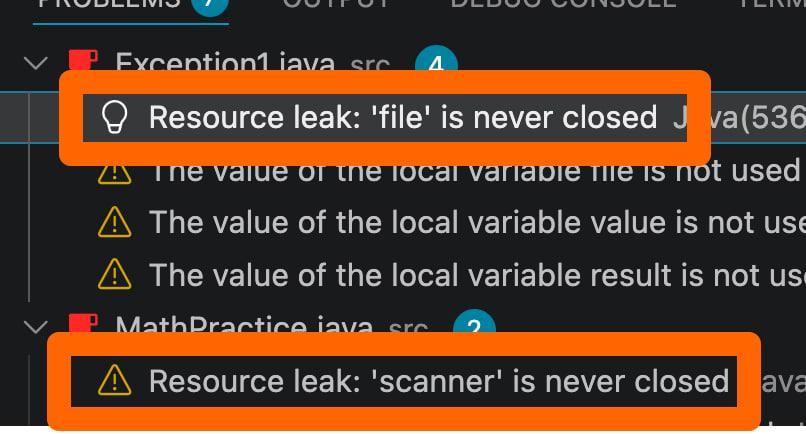
For example, when using a Scanner:
Scanner scanner = new Scanner(System.in);

System.out.print("Enter your name: ");
String name = scanner.nextLine();

scanner.close();After we are finished using the Scanner, we call:
scanner.close();This releases the resources used by the scanner.
Similarly, when working with a file reader, we should close it after we are finished reading the file:
FileReader reader = new FileReader("example.txt");

int data = reader.read();

reader.close();If the reader is not closed, the underlying file resource may remain open longer than necessary.
Why Should We Close Resources?
Resources such as Scanner, FileReader, BufferedReader, and other input/output classes may use system resources that should be released when they are no longer needed.
For example:
FileReader reader = new FileReader("example.txt");

// Read from the file...

reader.close();The call:
reader.close();tells Java that we are finished using the reader.
Failing to close resources can eventually lead to resource leaks, especially when a program opens many files or other resources.
This is particularly important in programs that run for a long time or repeatedly open resources.
What if an Exception Occurs?
There is an important problem with manually calling close().
Consider:
FileReader reader = new FileReader("example.txt");

int data = reader.read(); // Something goes wrong here

reader.close();If an exception occurs before reader.close() is reached, the reader may never be closed.
For example, if this line throws an exception:
int data = reader.read();the program may leave the resource open.
This is why Java provides try-with-resources.
Try-with-Resources
A better way to work with resources is to use a try-with-resources statement.
For example:
try (FileReader reader = new FileReader("example.txt")) {

    int data = reader.read();

}Here, Java automatically closes the FileReader when the try block finishes.
This happens even if an exception is thrown while working with the resource.
Because of this, we do not need to manually write:
reader.close();The resource is closed automatically.
The same approach can be used with many classes that implement AutoCloseable, including Scanner:
try (Scanner scanner = new Scanner(System.in)) {

    System.out.print("Enter your name: ");
    String name = scanner.nextLine();

}When the try block finishes, Java automatically closes the Scanner.
Trap: Closing a Scanner also closes System.in
When you close a Scanner that wraps System.in, Java also closes System.in itself. This happens whether you call scanner.close() yourself or let try-with-resources do it.
Once System.in is closed, it cannot be reopened. So if your program creates another Scanner later, reading from it fails:
try (Scanner scanner = new Scanner(System.in)) {
    String name = scanner.nextLine();
} // System.in is closed here too

Scanner another = new Scanner(System.in);
String city = another.nextLine(); // NoSuchElementExceptionEasy way to remember: create one Scanner for System.in, reuse it for all keyboard input, and close it only once, at the very end of your program.
That's a wrap on my study notes on Java tips and tricks! I hope they've helped you as much as they've helped me.
Now that you know the tricky traps, are you ready to see how I actually survived the exam and the viva? 😂 You can continue to Part Two: Actual Exam & Viva 👉
Sharing is caring! ❤️